

Woo Location Filter – Location Based Product Filter for WooCommerce
Woo Location Filter is a powerful WooCommerce location-based product filter plugin that helps store owners show products, blog posts, delivery information, pricing, stock and SEO content based on the customer’s selected location.
With this plugin, admin can create multiple locations and assign WooCommerce products and WordPress blog posts to those location taxonomies. Once a customer selects a location from the popup or shortcode, the website displays products and content based on the selected location.
Location Based Product & Blog Post Filtering
Admin can create unlimited locations and map products or blog posts with those locations. This allows your WooCommerce store to show only the relevant products and posts based on the customer’s delivery area, city, zone or service location.
The plugin also supports popular multivendor plugins like Dokan and WCFM Marketplace, so vendors can also assign their products to available locations.
Key Features
- Create and manage multiple location taxonomies.
- Assign WooCommerce products to specific locations.
- Assign WordPress blog posts to specific locations.
- Support for Dokan and WCFM Marketplace vendors.
- Show location selection popup on website load.
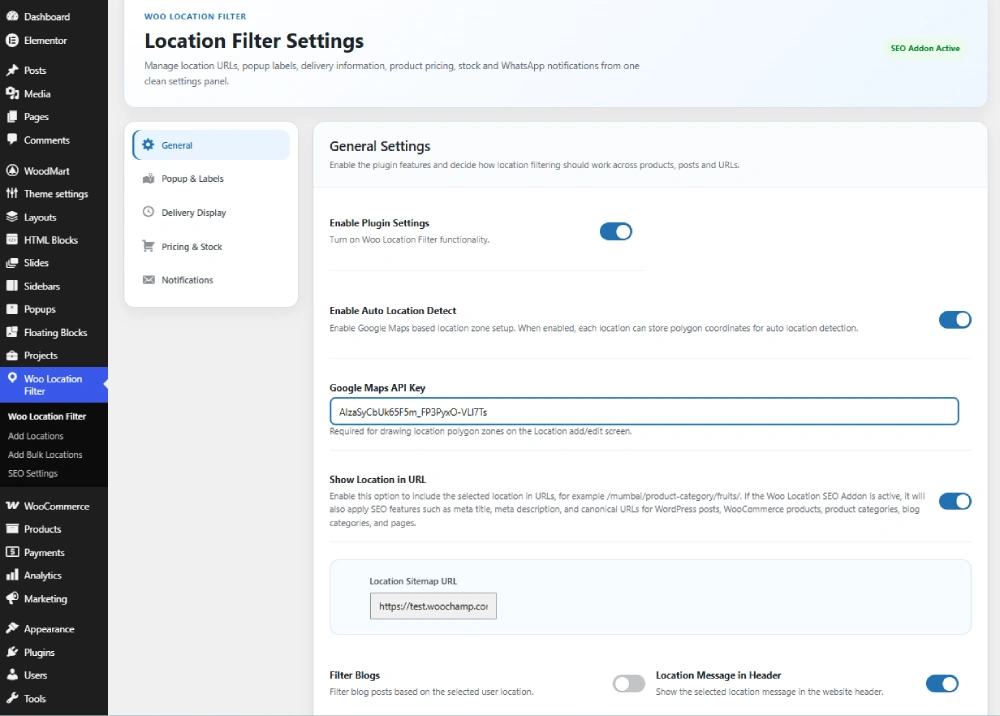
- Use cookies for site-wide location-based filtering.
- Show products based on the selected customer location.
- Hide products that are not available for the selected location.
- Customize popup title, description and shortcode labels.
- Show selected location anywhere using shortcodes.
Location Wise Delivery Time, Days & Message
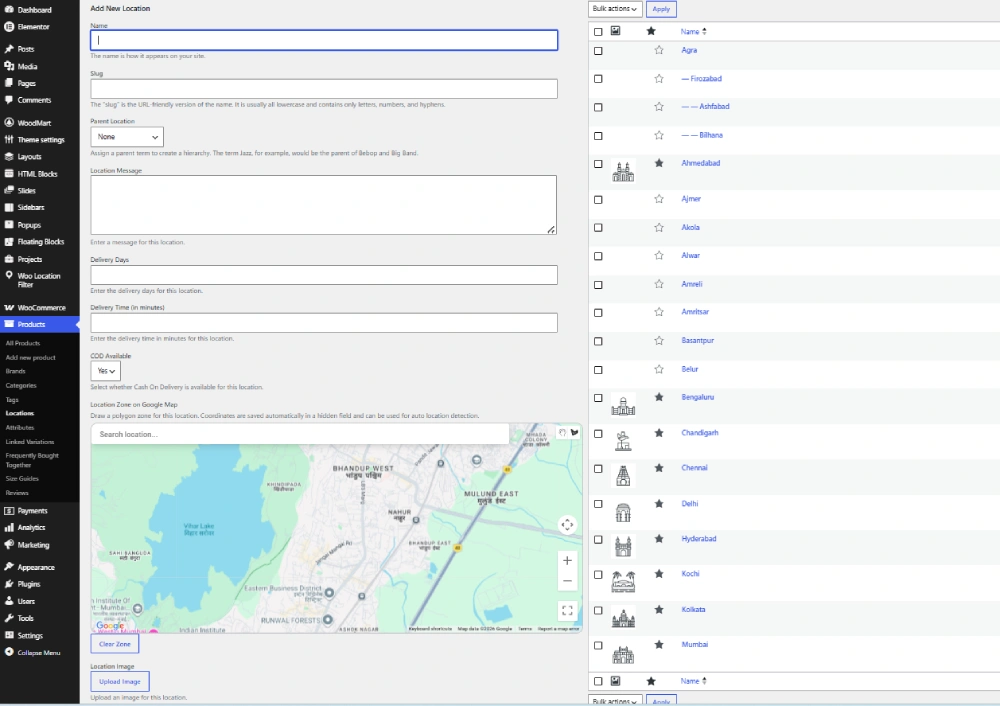
Admin can set location-specific delivery information such as estimated delivery days, delivery time and custom location messages. This helps customers clearly understand delivery availability and expected delivery time for their selected location.
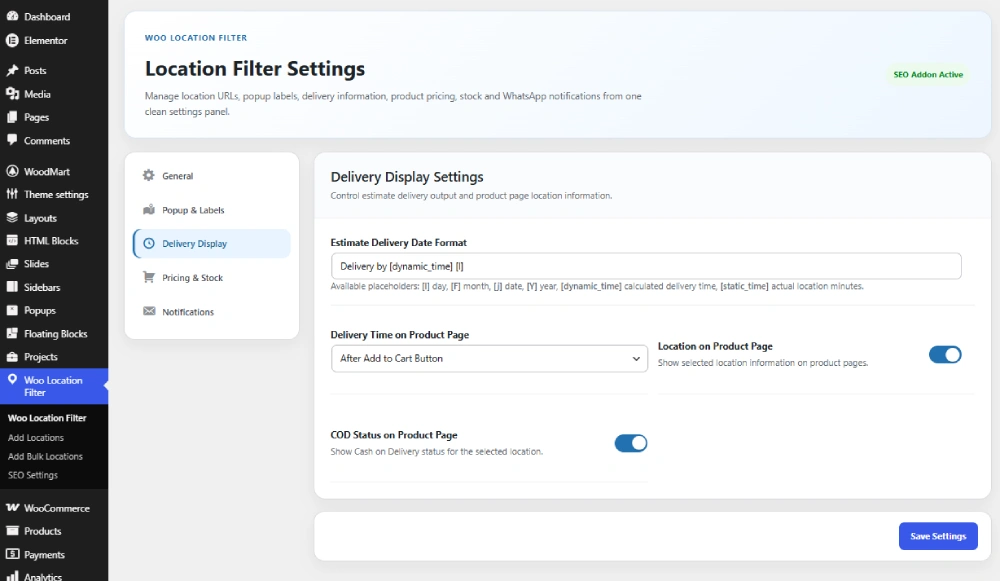
Admin can also format the estimated delivery text using dynamic placeholders.
[l]– Day name[F]– Month name[j]– Date[Y]– Year[dynamic_time]– Calculated delivery time[static_time]– Actual location minutes
Example delivery format:
Delivery by [dynamic_time] [l]
Location Wise Price & Stock Management
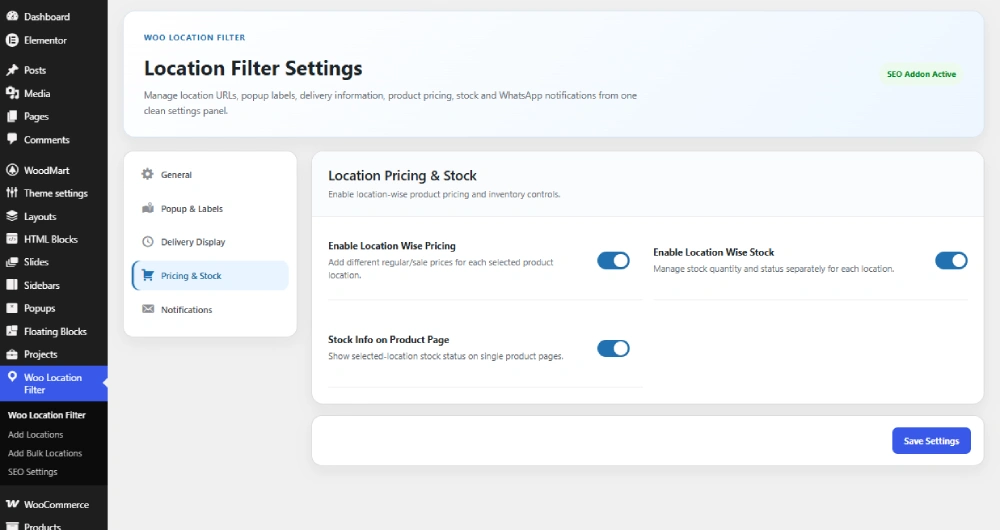
Woo Location Filter allows admin to manage product price and stock based on selected locations. You can set different prices, stock quantities and stock status for each selected location of a product.
- Set location-wise regular price and sale price.
- Manage location-wise product stock.
- Show location-specific stock information on product pages.
- Control product availability based on customer location.
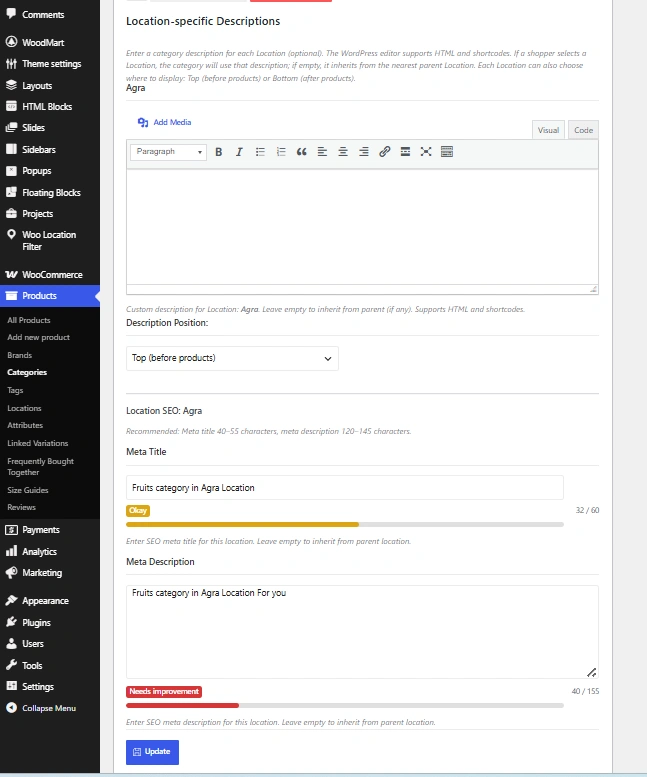
Location Wise WooCommerce Category Description
Admin can add different WooCommerce product category descriptions for different locations. This helps show more relevant category content based on the selected location and improves the customer browsing experience.
Checkout Location Verification
The plugin includes checkout verification to avoid wrong-location product purchases. For example, if a customer has selected Location A but tries to purchase a product available only for Location B, the system can show a warning and ask the customer to replace or remove the product from the cart.
This helps prevent order confusion and keeps the checkout process location-aware.
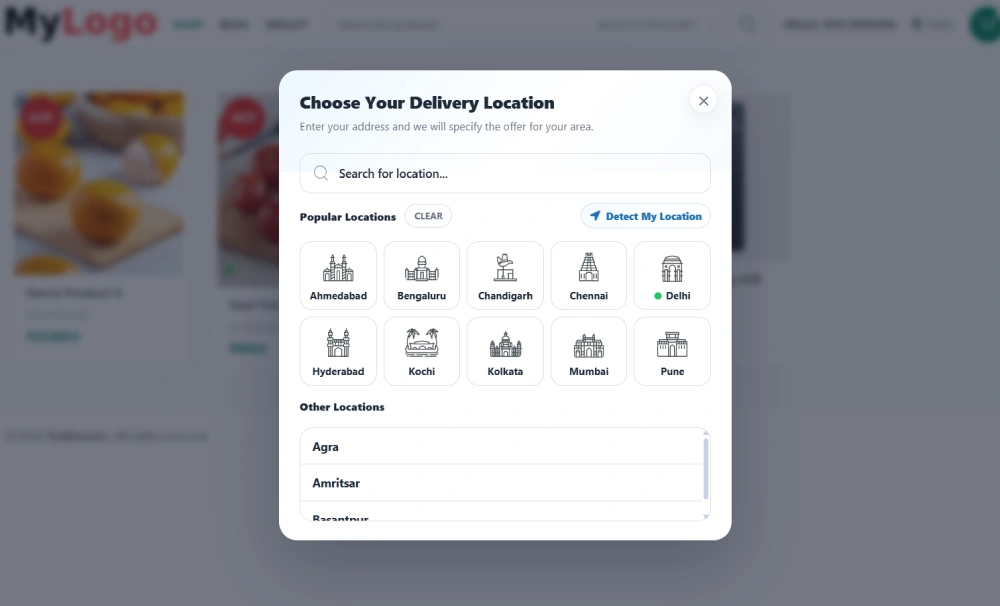
Customizable Location Popup
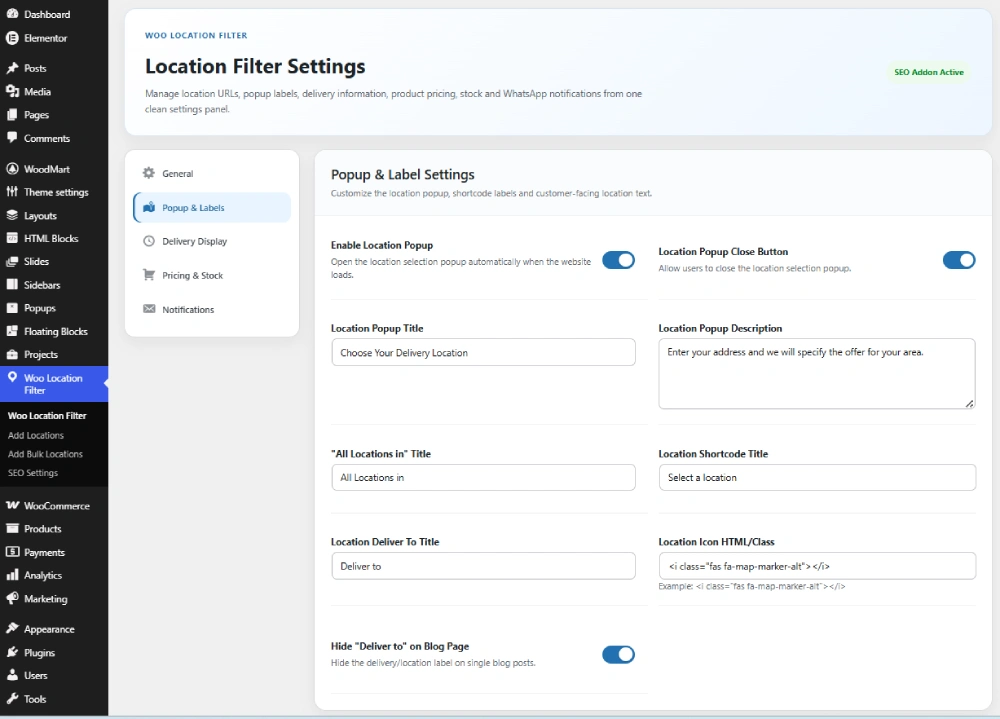
Woo Location Filter includes a customizable location popup. Admin can enable the popup on website load, customize popup title and description, and control whether customers can close the popup or must select a location first.
- Customize popup title.
- Customize popup description.
- Customize default location shortcode title.
- Enable or disable popup close button.
- Show popular and other locations in a clean popup layout.
Shortcodes
The plugin provides useful shortcodes to display location information anywhere on your website, such as header, footer, page, sidebar or product template.
[woo_location]– Show location selector.[woo_location_delivery_time]– Show selected location delivery time.[woo_location_cod_status]– Show selected location COD availability status.
Location Wise COD Availability
Admin can set Cash on Delivery availability for each location and choose whether to show location-wise COD status on the product page. This helps customers know whether COD is available for their selected area.
WhatsApp Stock Notifications
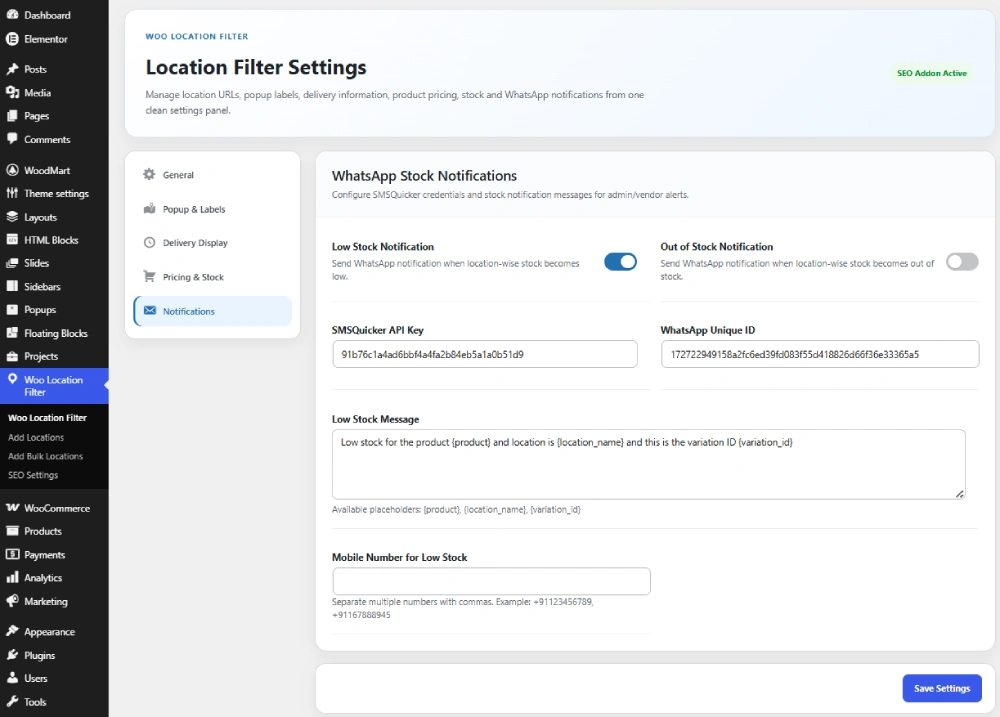
Admin can set up stock notifications and receive updates on WhatsApp when location-wise stock becomes low or out of stock. This feature helps store owners and vendors manage inventory faster and avoid missed sales.
Auto Location Detection with Coordinates
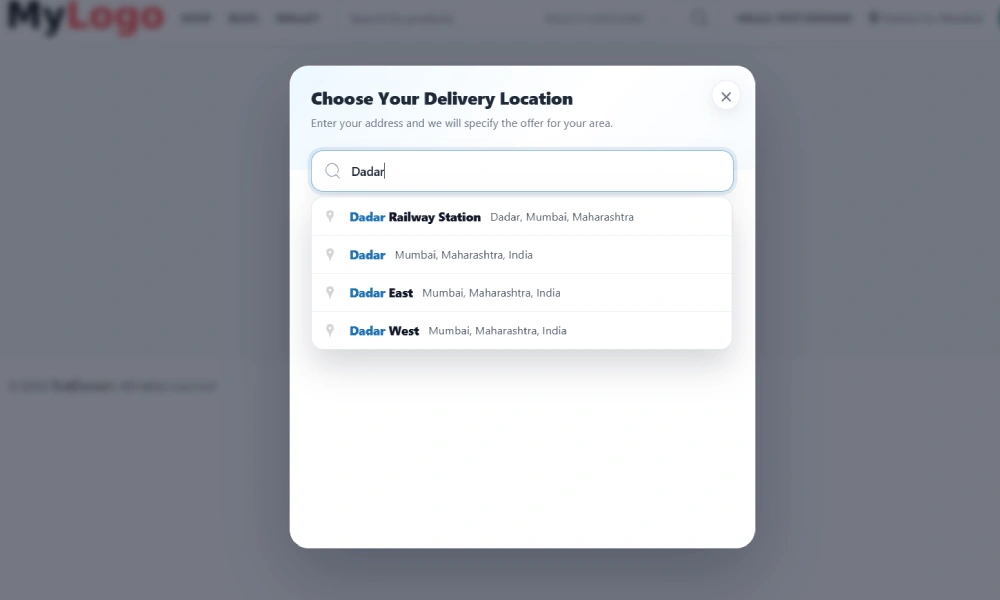
Woo Location Filter also supports auto location detection. If admin enables the detect location option and sets location coordinates, customers can click on the Detect My Location button. The system detects the customer’s current location and automatically selects the matching location on the website.
This makes the shopping experience faster and more accurate for customers.
Location Wise SEO Support
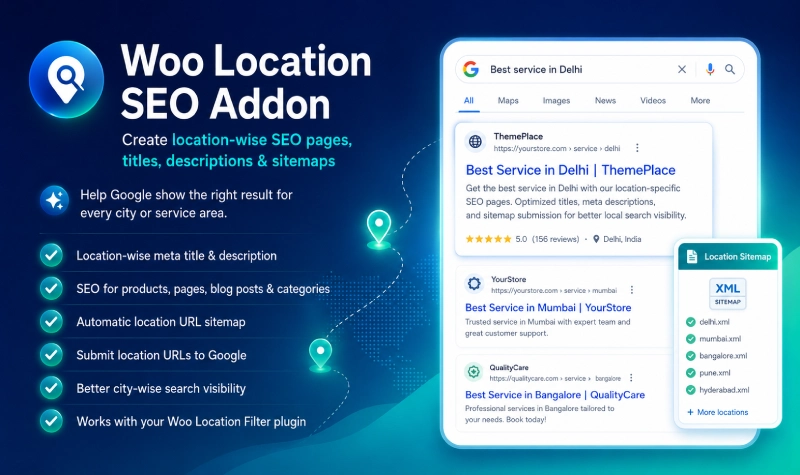
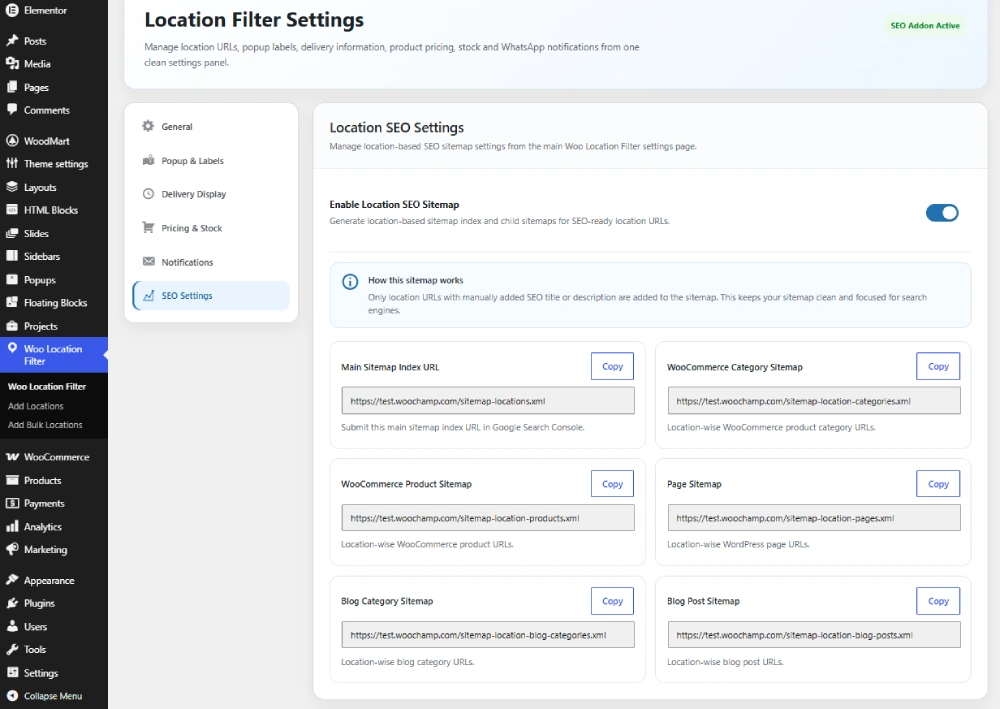
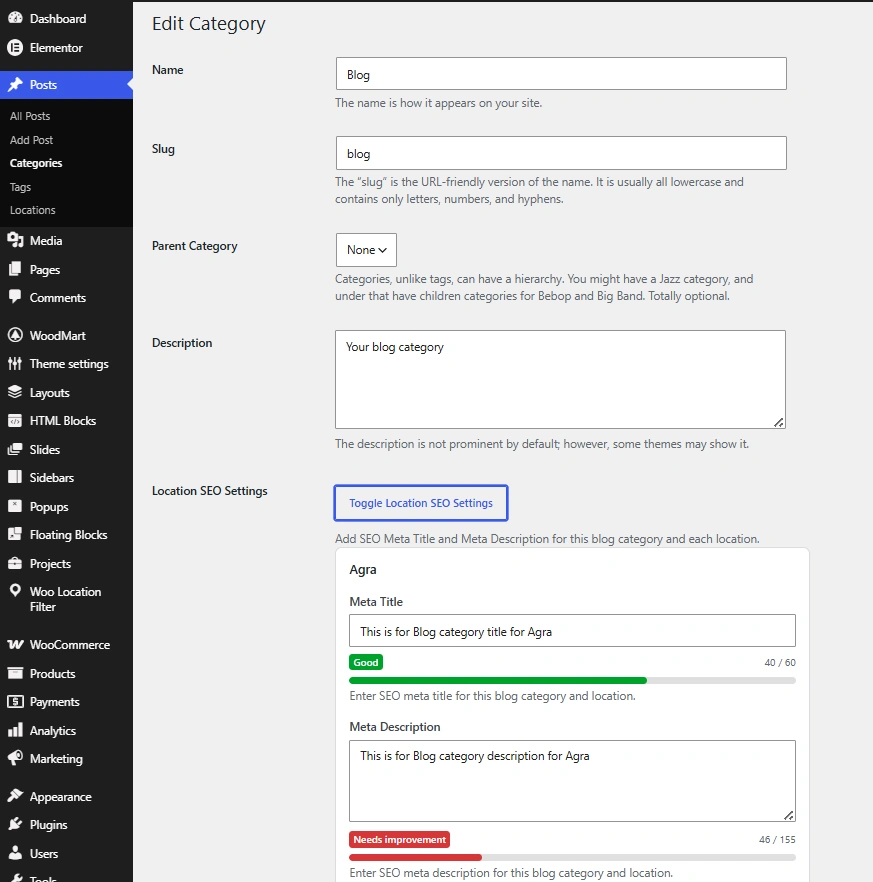
Woo Location Filter can also support location-wise SEO settings through the Woo Location SEO Addon. Admin can create SEO-friendly location URLs and add separate meta titles and meta descriptions for products, product categories, pages, blog posts and blog categories.
- Location-wise SEO for WooCommerce products.
- Location-wise SEO for WooCommerce product categories.
- Location-wise SEO for WordPress pages.
- Location-wise SEO for blog posts.
- Location-wise SEO for blog categories.
- Location URL sitemap support.
Best For
- WooCommerce stores selling products in multiple cities or service areas.
- Local delivery businesses.
- Grocery, food, pharmacy, flower, cake and hyperlocal stores.
- Service websites with city-wise availability.
- Marketplace websites using Dokan or WCFM Marketplace.
- Websites that need location-based product visibility, pricing and stock.
Why Choose Woo Location Filter?
Woo Location Filter gives store owners better control over product visibility, delivery information, pricing, stock and customer experience based on location. Instead of showing the same products to every visitor, you can show only the products, posts and details that are relevant to the customer’s selected area.
Whether you run a single-vendor WooCommerce store or a multivendor marketplace, this plugin helps you create a smarter location-based shopping experience.
Conclusion
Woo Location Filter is a complete location-based WooCommerce solution for filtering products, managing delivery information, setting location-wise prices and stock, verifying checkout location, showing COD availability, sending WhatsApp stock notifications and improving location-based SEO.
If your WooCommerce store serves multiple locations, cities or delivery zones, this plugin can help you provide a better and more accurate shopping experience to your customers.
Setup Location Wise SEO settings and Index your website in google for showing location based search results
Note: location wise SEO settings required this addional Location SEO Addon plugin
View screenshots below
1 Manage your Woo Location Filter Settings
Add Your Locations
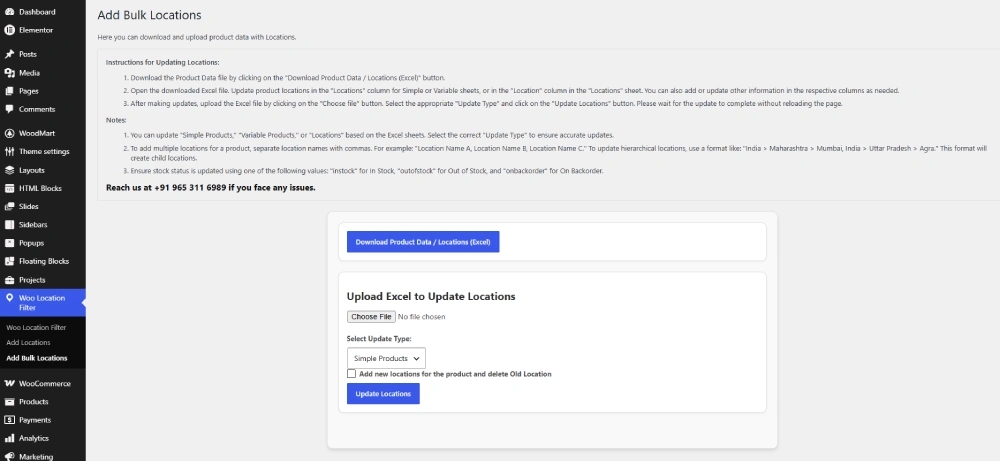
Add bulk locations using excel
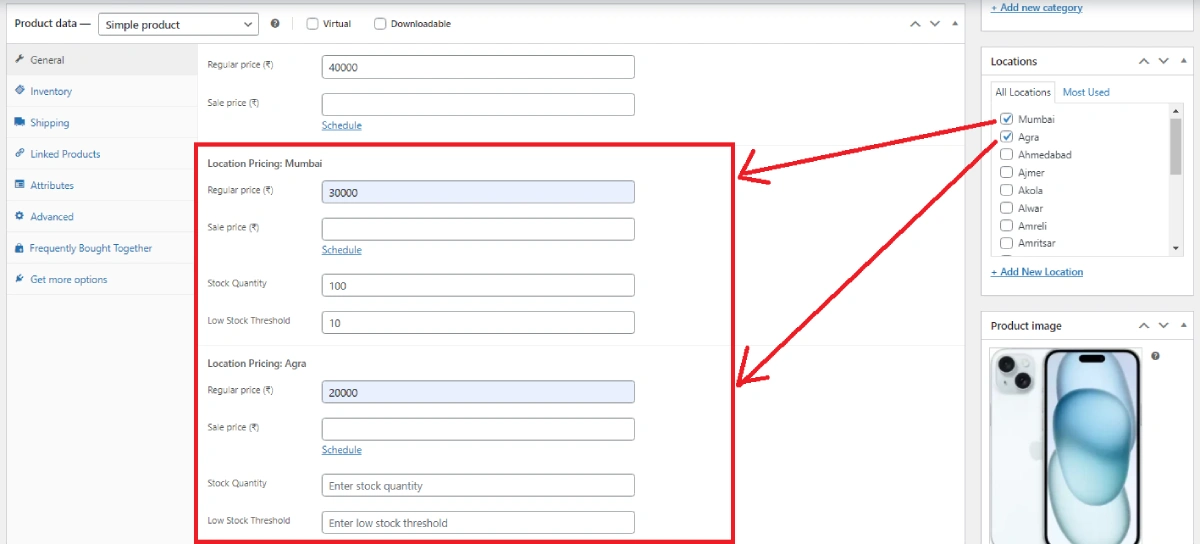
Add your locations to woocommerce simple or variable products and set location wise prices or stock information if needed
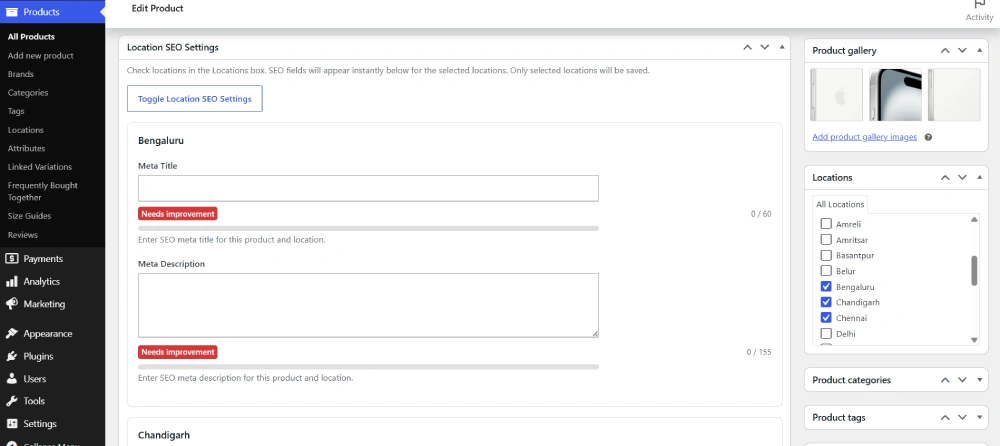
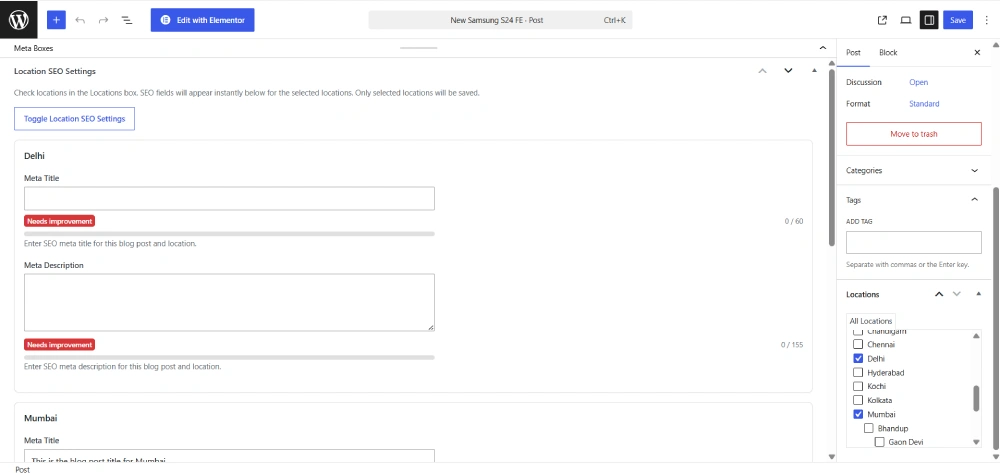
If you have activated Location SEO Addon then you can also set location wise SEO settings for your products, categories, blog posts and blog categories.
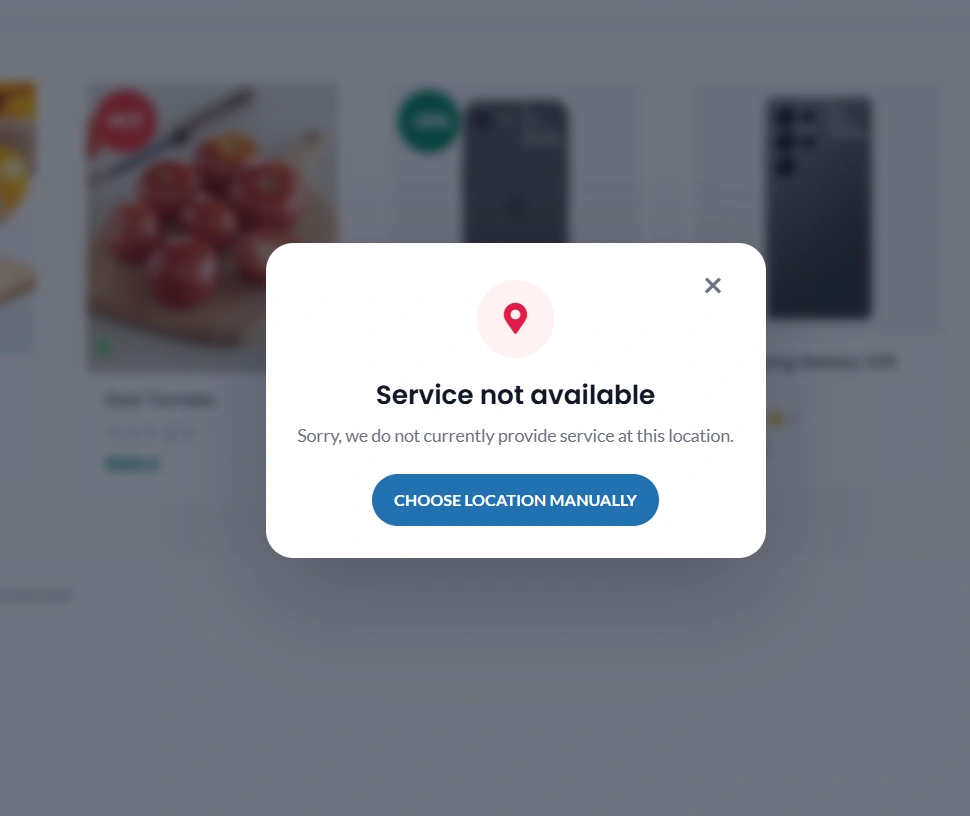
You can use shortcode [woo_location] or you can enable auto location popup for your visitors
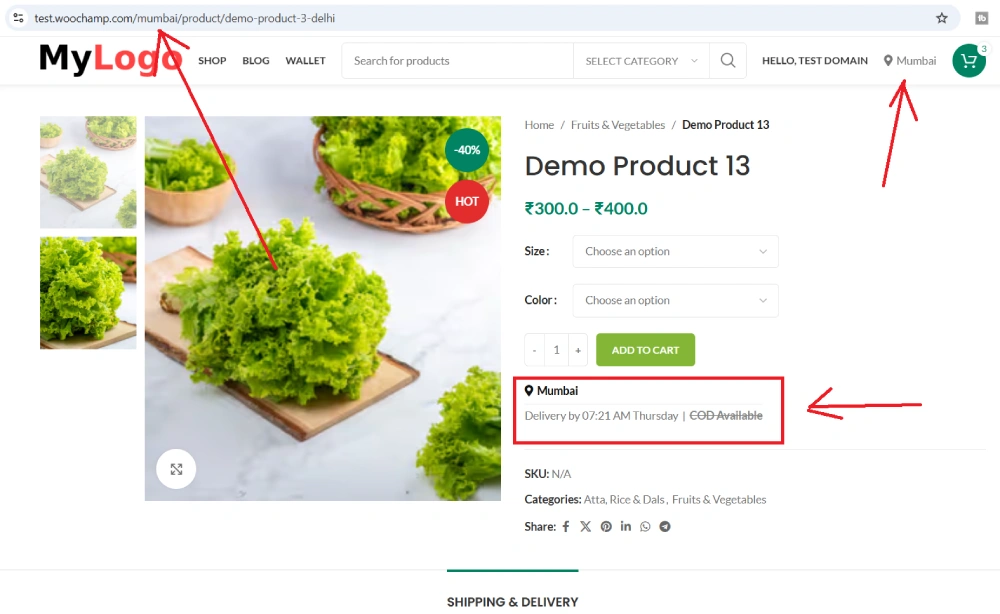
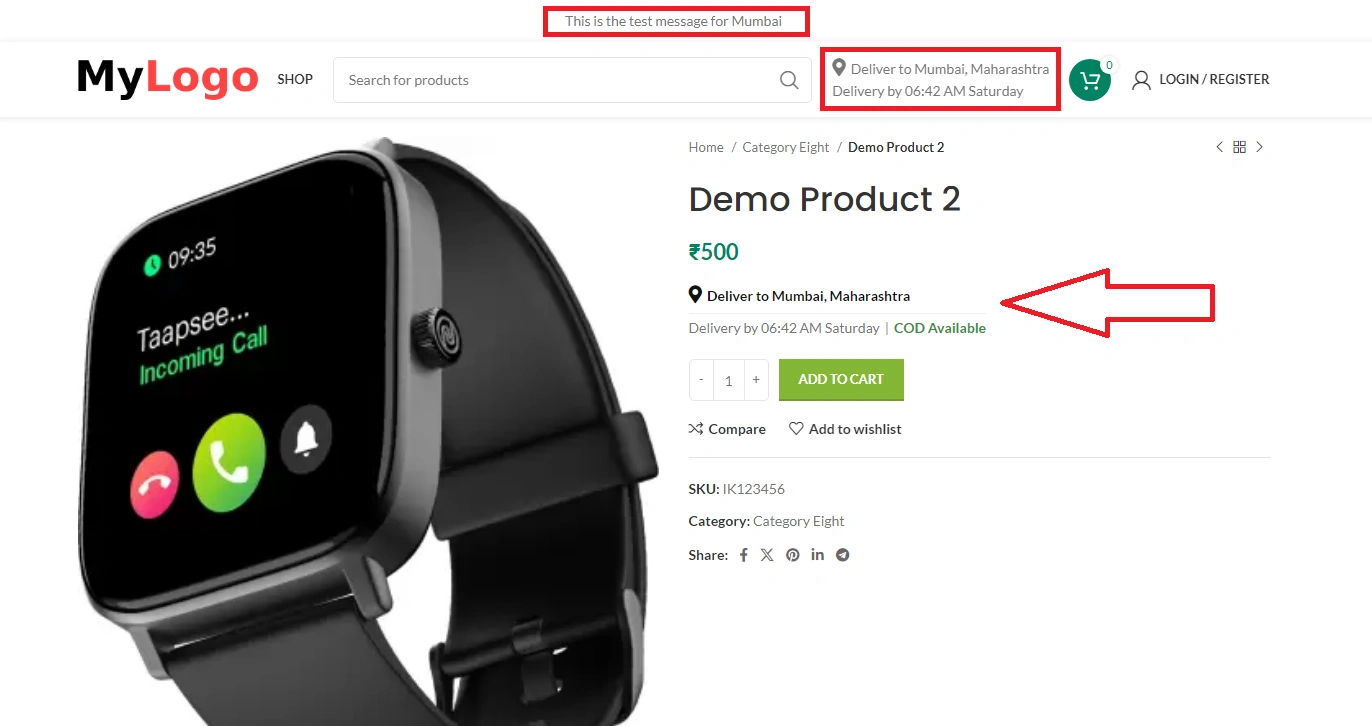
Enable product page settings in Woo Location Filter options and show selected location, estimate delivery time, cod status on single product page also it product feature to show location wise message in header.
Change log:
06-06-2026 – v1.0.21
- Restructure and Improved Location popup
- Added location wise SEO compatibility using Location SEO Addon Plugin, click to know more
- Added Auto Location Detect Feature
- Added new option for location to set zone for location as this mandatory for Auto Location detection feature
- Added new option to allow google search in location popup search field
- Fixed some known issues
04-06-2026 – v1.0.20
- Fixed some known issues
19-05-2026 – v1.0.19
- Fixed URL redirection issuw when user visit from external source
- Fixed some known issues
14-05-2026 – v1.0.18
- Added the location in URL priority so it should work with google search search results properly using our Location SEO add on
- Fixed some known issues
20-03-2026 – v1.0.17
- Fixed some known issues
18-03-2026 – v1.0.16
- Fixed some known issues
16-03-2026 – v1.0.15
- Improved plugin logic
- Added category title change dynamically based on selected location
- Fixed some known issues
18-07-2025 – v1.0.14
- Improved Location Wise Pricing logic
- Fixed some known issues
15-07-2025 – v1.0.13
- Now child featured locations will shown in popular location section.
- Added option for vendor to select default store location so that when vendor add new product then default store location will be auto mapped with product.
- Added option to remove select location option from Add/Edit product page.
- Fixed few know issues
03-12-2024 – v1.0.12
- Restructured Location wise fields
- Added Location Wise Stock Status – If you set location wise stock status as Instock and woocommerce global status as Out of stock then if user select the location then product will be shown as In stock for the selected location.
- Added Featured location logic for child location – Now all the child featured locations will be shown on the top of child locations list.
- Bulk location upload improved
- Fixed few know issues
01-12-2024 – v1.0.11
- Added child location option
- Added option to update locations, price for simple and variable products in bulk
- Fixed few know issues
23-11-2024 – v1.0.10
- Added option to enable or disable blogs filter
22-11-2024 – v1.0.9
- Added option to filter blog posts as per location
- Added option to customize location shortcode
- Fixed some knows issues
29-09-2024 – v1.0.8
- Restructured location wise prices and stock options.
28-09-2024 – v1.0.7
- Fixed location popup issue as popup was not showing when its added multiple times on same page.
27-09-2024 – v1.0.6
- Added option to set location wise prices for simple or variable products
- Added option to set location wise stock information for simple or variable products
- Added option to show stock information on product page
- Added option automatically send stock notification on WhatsApp if stock is low or item is out of stock
- Added option to send stock notifications on multiple WhatsApp number
- Added option to prevent other location to purchase if item does not belongs to selected location by user
- Fixed some know issues
23-09-2024 – v1.0.5
- Added option to set location wise prices for simple and variable products
- Added option to enable location wise price settings
- Fixed some know issues
20-09-2024 – v1.0.4
- Improved Bulk upload location option
- Now you can add multiple location name separated by comma to upload multiple locations
- Fixed some known issues
18-09-2024 – v1.0.3
- Restructured the plugin to make it simple and user friendly
- Added option to add bulk locations
- Improved location popup layout
- Fixed some known issues
09-07-2024 – v1.0.2
- Fixed some know issues
06-07-2024 – v1.0.1
- Redesigned complete plugin
- Added option to show estimate delivery time on single product page
- Added new option to add locations
28-03-2023 – v1.0.0
- Initial Release
1 review for Woo Location Filter – Location Based Products for WooCommerce
Only logged in customers who have purchased this product may leave a review.

Secure Checkout

Instant Download

Regular Updates

1 Year Free Support

Woo Location Filter – Location Based Product Filter for WooCommerce
Woo Location Filter is a powerful WooCommerce location-based product filter plugin that helps store owners show products, blog posts, delivery information, pricing, stock and SEO content based on the customer’s selected location.
With this plugin, admin can create multiple locations and assign WooCommerce products and WordPress blog posts to those location taxonomies. Once a customer selects a location from the popup or shortcode, the website displays products and content based on the selected location.
Location Based Product & Blog Post Filtering
Admin can create unlimited locations and map products or blog posts with those locations. This allows your WooCommerce store to show only the relevant products and posts based on the customer’s delivery area, city, zone or service location.
The plugin also supports popular multivendor plugins like Dokan and WCFM Marketplace, so vendors can also assign their products to available locations.
Key Features
- Create and manage multiple location taxonomies.
- Assign WooCommerce products to specific locations.
- Assign WordPress blog posts to specific locations.
- Support for Dokan and WCFM Marketplace vendors.
- Show location selection popup on website load.
- Use cookies for site-wide location-based filtering.
- Show products based on the selected customer location.
- Hide products that are not available for the selected location.
- Customize popup title, description and shortcode labels.
- Show selected location anywhere using shortcodes.
Location Wise Delivery Time, Days & Message
Admin can set location-specific delivery information such as estimated delivery days, delivery time and custom location messages. This helps customers clearly understand delivery availability and expected delivery time for their selected location.
Admin can also format the estimated delivery text using dynamic placeholders.
[l]– Day name[F]– Month name[j]– Date[Y]– Year[dynamic_time]– Calculated delivery time[static_time]– Actual location minutes
Example delivery format:
Delivery by [dynamic_time] [l]
Location Wise Price & Stock Management
Woo Location Filter allows admin to manage product price and stock based on selected locations. You can set different prices, stock quantities and stock status for each selected location of a product.
- Set location-wise regular price and sale price.
- Manage location-wise product stock.
- Show location-specific stock information on product pages.
- Control product availability based on customer location.
Location Wise WooCommerce Category Description
Admin can add different WooCommerce product category descriptions for different locations. This helps show more relevant category content based on the selected location and improves the customer browsing experience.
Checkout Location Verification
The plugin includes checkout verification to avoid wrong-location product purchases. For example, if a customer has selected Location A but tries to purchase a product available only for Location B, the system can show a warning and ask the customer to replace or remove the product from the cart.
This helps prevent order confusion and keeps the checkout process location-aware.
Customizable Location Popup
Woo Location Filter includes a customizable location popup. Admin can enable the popup on website load, customize popup title and description, and control whether customers can close the popup or must select a location first.
- Customize popup title.
- Customize popup description.
- Customize default location shortcode title.
- Enable or disable popup close button.
- Show popular and other locations in a clean popup layout.
Shortcodes
The plugin provides useful shortcodes to display location information anywhere on your website, such as header, footer, page, sidebar or product template.
[woo_location]– Show location selector.[woo_location_delivery_time]– Show selected location delivery time.[woo_location_cod_status]– Show selected location COD availability status.
Location Wise COD Availability
Admin can set Cash on Delivery availability for each location and choose whether to show location-wise COD status on the product page. This helps customers know whether COD is available for their selected area.
WhatsApp Stock Notifications
Admin can set up stock notifications and receive updates on WhatsApp when location-wise stock becomes low or out of stock. This feature helps store owners and vendors manage inventory faster and avoid missed sales.
Auto Location Detection with Coordinates
Woo Location Filter also supports auto location detection. If admin enables the detect location option and sets location coordinates, customers can click on the Detect My Location button. The system detects the customer’s current location and automatically selects the matching location on the website.
This makes the shopping experience faster and more accurate for customers.
Location Wise SEO Support
Woo Location Filter can also support location-wise SEO settings through the Woo Location SEO Addon. Admin can create SEO-friendly location URLs and add separate meta titles and meta descriptions for products, product categories, pages, blog posts and blog categories.
- Location-wise SEO for WooCommerce products.
- Location-wise SEO for WooCommerce product categories.
- Location-wise SEO for WordPress pages.
- Location-wise SEO for blog posts.
- Location-wise SEO for blog categories.
- Location URL sitemap support.
Best For
- WooCommerce stores selling products in multiple cities or service areas.
- Local delivery businesses.
- Grocery, food, pharmacy, flower, cake and hyperlocal stores.
- Service websites with city-wise availability.
- Marketplace websites using Dokan or WCFM Marketplace.
- Websites that need location-based product visibility, pricing and stock.
Why Choose Woo Location Filter?
Woo Location Filter gives store owners better control over product visibility, delivery information, pricing, stock and customer experience based on location. Instead of showing the same products to every visitor, you can show only the products, posts and details that are relevant to the customer’s selected area.
Whether you run a single-vendor WooCommerce store or a multivendor marketplace, this plugin helps you create a smarter location-based shopping experience.
Conclusion
Woo Location Filter is a complete location-based WooCommerce solution for filtering products, managing delivery information, setting location-wise prices and stock, verifying checkout location, showing COD availability, sending WhatsApp stock notifications and improving location-based SEO.
If your WooCommerce store serves multiple locations, cities or delivery zones, this plugin can help you provide a better and more accurate shopping experience to your customers.
Setup Location Wise SEO settings and Index your website in google for showing location based search results
Note: location wise SEO settings required this addional Location SEO Addon plugin
View screenshots below
1 Manage your Woo Location Filter Settings
Add Your Locations
Add bulk locations using excel
Add your locations to woocommerce simple or variable products and set location wise prices or stock information if needed
If you have activated Location SEO Addon then you can also set location wise SEO settings for your products, categories, blog posts and blog categories.
You can use shortcode [woo_location] or you can enable auto location popup for your visitors
Enable product page settings in Woo Location Filter options and show selected location, estimate delivery time, cod status on single product page also it product feature to show location wise message in header.
Change log:
06-06-2026 – v1.0.21
- Restructure and Improved Location popup
- Added location wise SEO compatibility using Location SEO Addon Plugin, click to know more
- Added Auto Location Detect Feature
- Added new option for location to set zone for location as this mandatory for Auto Location detection feature
- Added new option to allow google search in location popup search field
- Fixed some known issues
04-06-2026 – v1.0.20
- Fixed some known issues
19-05-2026 – v1.0.19
- Fixed URL redirection issuw when user visit from external source
- Fixed some known issues
14-05-2026 – v1.0.18
- Added the location in URL priority so it should work with google search search results properly using our Location SEO add on
- Fixed some known issues
20-03-2026 – v1.0.17
- Fixed some known issues
18-03-2026 – v1.0.16
- Fixed some known issues
16-03-2026 – v1.0.15
- Improved plugin logic
- Added category title change dynamically based on selected location
- Fixed some known issues
18-07-2025 – v1.0.14
- Improved Location Wise Pricing logic
- Fixed some known issues
15-07-2025 – v1.0.13
- Now child featured locations will shown in popular location section.
- Added option for vendor to select default store location so that when vendor add new product then default store location will be auto mapped with product.
- Added option to remove select location option from Add/Edit product page.
- Fixed few know issues
03-12-2024 – v1.0.12
- Restructured Location wise fields
- Added Location Wise Stock Status – If you set location wise stock status as Instock and woocommerce global status as Out of stock then if user select the location then product will be shown as In stock for the selected location.
- Added Featured location logic for child location – Now all the child featured locations will be shown on the top of child locations list.
- Bulk location upload improved
- Fixed few know issues
01-12-2024 – v1.0.11
- Added child location option
- Added option to update locations, price for simple and variable products in bulk
- Fixed few know issues
23-11-2024 – v1.0.10
- Added option to enable or disable blogs filter
22-11-2024 – v1.0.9
- Added option to filter blog posts as per location
- Added option to customize location shortcode
- Fixed some knows issues
29-09-2024 – v1.0.8
- Restructured location wise prices and stock options.
28-09-2024 – v1.0.7
- Fixed location popup issue as popup was not showing when its added multiple times on same page.
27-09-2024 – v1.0.6
- Added option to set location wise prices for simple or variable products
- Added option to set location wise stock information for simple or variable products
- Added option to show stock information on product page
- Added option automatically send stock notification on WhatsApp if stock is low or item is out of stock
- Added option to send stock notifications on multiple WhatsApp number
- Added option to prevent other location to purchase if item does not belongs to selected location by user
- Fixed some know issues
23-09-2024 – v1.0.5
- Added option to set location wise prices for simple and variable products
- Added option to enable location wise price settings
- Fixed some know issues
20-09-2024 – v1.0.4
- Improved Bulk upload location option
- Now you can add multiple location name separated by comma to upload multiple locations
- Fixed some known issues
18-09-2024 – v1.0.3
- Restructured the plugin to make it simple and user friendly
- Added option to add bulk locations
- Improved location popup layout
- Fixed some known issues
09-07-2024 – v1.0.2
- Fixed some know issues
06-07-2024 – v1.0.1
- Redesigned complete plugin
- Added option to show estimate delivery time on single product page
- Added new option to add locations
28-03-2023 – v1.0.0
- Initial Release
1 review for Woo Location Filter – Location Based Products for WooCommerce
-

For a long time, I needed some option of this type, which would provide an option in my website, so that the customer could add his location. Now I have got this option through this plugin. This is an amazing end user friendly plugin. Very simple layout. Absolutely simple, simple and professional plugin. ( Awesome product )

Only logged in customers who have purchased this product may leave a review.
Ashish swami (verified owner) –
For a long time, I needed some option of this type, which would provide an option in my website, so that the customer could add his location. Now I have got this option through this plugin. This is an amazing end user friendly plugin. Very simple layout. Absolutely simple, simple and professional plugin. ( Awesome product )